2013年5月10日 星期五

IE8 與 Knockout js

客戶抱怨網頁呈現不正確。資料出不來。

看了一下,客戶使用的是 IE8 on Windows 7。天啊!算很新的系統,但就是不肯更新 IE 版本。

問題在 Knockoutjs

我用IE 10 按F12 開發者工具,檢查一下錯誤的 javascript

image

SCRIPT5022: Unable to parse bindings.
Message: SyntaxError: Expected identifier, string or number;
Bindings value: text: CompanyName, attr: { for: 'c' + TaxNo()}

binding 的 html 如下

<label data-bind="attr:{for: 'r' + ReportHeaderId()}, text: ReportName"></label>

原因

舊版本IE 會將 for: 當成 javascript 的保留字,想把它當成 javascript 來跑,因而錯誤。

解法

加上單引號,變成字串即可

<label data-bind="attr:{'for': 'r' + ReportHeaderId()}, text: ReportName"></label>

2013年5月8日 星期三

There was a mismatch between the processor architecture of the project being built "MSIL" and the processor architecture of the reference

問題

使用Visual Studio 2012 建置專案時,出現了如下的錯誤

Warning    6    There was a mismatch between the processor architecture of the project being built "MSIL" and the processor architecture of the reference "msshrtmi, Version=1.8.0.0, Culture=neutral, PublicKeyToken=31bf3856ad364e35, processorArchitecture=AMD64", "AMD64". This mismatch may cause runtime failures. Please consider changing the targeted processor architecture of your project through the Configuration Manager so as to align the processor architectures between your project and references, or take a dependency on references with a processor architecture that matches the targeted processor architecture of your project.   

原因

我在這個專案使用了 Windows Azure的雲端 assembly msshrtmi,並且指定了 x64的版本。但在建置的設定上,卻指定為 Any CPU。雖然編譯會過,但一定要部署到 x64 的作業系統才能正常運作。

在 .NET 4.5 後 ,編譯會多出這樣的警告。

解決

一直出現這樣的警告實在很惱人。把該專案的 Platform target 設成 x64 就解決了這個問題

image

解決 TFS Build 時 出現 C:\Windows\Microsoft.NET\Framework64\v4.0.30319\Microsoft.Common.targets (983) 的警告

問題

當我在 Team Foundation Server 上佇列一個新的組建後,組鍵的結果常常跑出一堆的警告。如下

C:\Windows\Microsoft.NET\Framework64\v4.0.30319\Microsoft.Common.targets (983): The reference assemblies for framework ".NETFramework,Version=v4.5" were not found. To resolve this, install the SDK or Targeting Pack for this framework version or retarget your application to a version of the framework for which you have the SDK or Targeting Pack installed. Note that assemblies will be resolved from the Global Assembly Cache (GAC) and will be used in place of reference assemblies. Therefore your assembly may not be correctly targeted for the framework you intend.

不處理,好像也沒什麼事。只是,一直覺得怪怪的。

解法

原來,雖然我在 Build Server 上有安裝了 .NET Framework V4.5, 可以順利的建置,仍然會出現上述的警告。在Build Server 上安裝  Windows Software Development Kit (SDK) for Windows 8 後,就不會再出現這些惱人的警告了。

2013年3月15日 星期五

WCF Data Services 使用 JSON 格式

好久沒有使用 WCF Data Services 了。

這次 Demo 時,意外發現 WCF Data Services 在 5.3 時(其實更早)已經內建支援 JSON 格式,只是瀏覽器上不太容易試出來。下面,我們就一步步寫出來吧!

STEP1 資料

找一個資料庫吧。我使用 VS2012,隨便開一個 SQL Server (不能是 LocalDB,否則掛在 IIS 上會有問題)。

CREATE TABLE [dbo].[Users](
    [EmpNo] [char](8) NOT NULL,
    [EmpName] [nvarchar](10) NOT NULL,
    [Password] [varchar](64) NOT NULL,
 CONSTRAINT [PK_Users] PRIMARY KEY CLUSTERED 
(
    [EmpNo] ASC
)WITH (PAD_INDEX = OFF, STATISTICS_NORECOMPUTE = OFF, IGNORE_DUP_KEY = OFF, ALLOW_ROW_LOCKS = ON, ALLOW_PAGE_LOCKS = ON) ON [PRIMARY]
) ON [PRIMARY]

寫入一兩筆料吧。

image

STEP2 EDMX

建立一個Empty ASP.NET application專案(使用 IIS,為了後面Fiddler 能錄到 json 格式)後,再建立一個  ado.net entity model,並且加入剛剛的 Table 作為測試的 Entity Set

image  image

並且,IIS 對應的 Application Pool 先改用 LocalSystem

SNAGHTML56e33f7


STEP3 建立 Data Service

建立一個名為 DemoWcfDataService.svc,並且修改對應的程式如下

SNAGHTML548f7d1

public class DemoWcfDataService : DataService<DemoEntities>
{
    public static void InitializeService(DataServiceConfiguration config)
    {
        config.SetEntitySetAccessRule("*", EntitySetRights.AllRead);
        config.DataServiceBehavior.MaxProtocolVersion = DataServiceProtocolVersion.V3;
    }
}

執行

http://localhost/DS5Service/DemoWcfDataService.svc/Users 

果然是 xml 格式

image

但如果執行 http://localhost/DS5Service/DemoWcfDataService.svc/Users/?$format=json,則會回傳 400 的 http status code,意思就是不支援。

image

STEP4 更新成 DS 5.3

在專案上使用 NuGet,更新成 DS 5.3

SNAGHTML5559799

再執行一下相同的 URL, 就得到了 JSON格式的資料了

image

image

嗯!感覺真好。

STEP5 Client Side

那 Client side 如何取得 json 的資料呢?建立一個 Console Application ,並且 Add Service Reference,如下

SNAGHTML56307aa

程式如下

static void Main(string[] args)
{
    var context = new DemoEntities(new Uri("http://myhost/DS5Service/DemoWcfDataService.svc"));
    var users = context.Users;
    foreach (var user in users)
    Console.WriteLine(user.EmpName);
}

程式可正常執行。但使用的並不是JSON 格式

STEP6 Client 更新成 DS 5.3

SNAGHTML57d15ae

接下來,要將 System.Data.Services.Client 移除,因為這已經被 Microsoft.Data.Services.Client 取代了

image

增加下面兩行程式,說明我們要使用 JSON 格式

context.Format.LoadServiceModel();
            context.Format.UseJson();

image

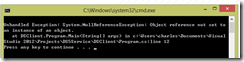
執行結果竟是:System.NullReferenceException: Object reference not set to an instance of an object.
image

STEP7 安裝 DS Tools 5.3

找到 WCF Data Services 5.3.0 RTM Tools Installer, 先關掉 Visual Studio 2012 後安裝 WcfDataServices.exe。

再打開solution,  刪除舊的 Service Reference,重新執行 STEP5 後,重新執行程式。就正常了 。

image

結論

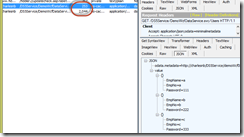
使用 Fiddler 錄一下 Request / Response,使用JSON 格式的資料遠小於 xml 格式 (253 vs. 2044) 真的省好多哦!
image

2013年2月27日 星期三

假 Facebook email 攻擊使用者電腦的 java 的漏泂

今天早上我收到兩封信,其中一封假裝有人給了我照片的意見,如下

SNAGHTML18d44ebd

連結指向的網址,當然不是 Facebook 的官網。

我找了一台虛擬機(之後可再還原)試了一下該網址,看了一下 html code.

果然是攻擊時下最夯的 java 漏洞。美指JAVA有安全漏洞籲停用。這可是通過美國政府認證的哦!

即使後來 Oracle 出了 Java 7 Update 11, 但Java更新補漏洞 美國土安全部仍說勿用!

clip_image004

反正現在很少網站使用 Java Applet 了,將它關掉或移除吧!


ps: 不知道現在最新的 update 15 解決了這個問題沒有?

2013/3/10 : 兩次更新徒勞無功,Java再爆嚴重漏洞 ,所以目前(2013/3/13) 還是不安全

2013年2月19日 星期二

ASP.NET and Web Tools 2012.2 Release

http://www.hanselman.com/blog/ReleasedASPNETAndWebTools20122InContext.aspx

超強!微軟開發工具的更新週期愈來愈快了!

一堆我超想要的功能,一次都出來了。

例如:

Intellisense for Knockout.js bindings!

JsRender Syntax Highlighting

ASP.NET

· OData support in ASP.NET Web API

· SignalR included out of the box and fully supported

· Web Forms now supports Friendly URLs (no more .aspx extension)

· Web Forms supports device (mobile) specific pages, so product.aspx can also have product.mobile.aspx.

· Updated Single Page Application template

· MVC Facebook Application Template

· Web Sites get the same publishing tools as Web Projects

Single Page Application (SPA) templates

使用 Visual Studio 2012 的就快去下載!

Ref.

 http://aspnet.codeplex.com/

ASP.NET and Web Tools 2012.2 Release Notes

http://www.johnpapa.net/knockout-intellisense-in-visual-studio-2012/

http://www.johnpapa.net/inside-the-asp-net-single-page-apps-template/

.NET Framework 也是有技術支援週期的哦!

微軟的產品有支援迥期。.NET Framework 也有,見 http://support.microsoft.com/lifecycle/?c2=548

名詞解譯:

主流支援:會有 Service Pack(增加新功能),Bug fix 等。

延伸支援:是指微軟會負責修正 bug,資安問題等。

過了延伸支援,還使用過了生命週期的產品,代表您因此產生任何損失,請自行負責,一律不關微軟的事。

需要注意的是:

1. .NET Framework 1.0, 1.1, 2.0 請不要再使用了。微軟已經不支援(主流),代表不再支援新的功能,以軟體開發商來說,使用這些舊版的framework來開發新專案是自找麻煩。

2. .NET Framework 3.5 SP1 之後的版本,內建在 Windows 平台,視為 Windows 的元件,故與 Windows 平台生命週期一致

clip_image002

我的建議:新專案,一律使用最新的 Windows 及 .NET Framework 版本。

Share with Facebook